 |
Log In |
| Home | Forums | Shops | Trade | Avatar | Inbox | Games | Donate |
| Not Logged In |
 Trisphee
 |
|
|
Thread Tools |
Fenris

Art Meiser



|

|
How to change your thread titles as a User. | #1 | |
|
THIS HAS BEEN TESTED BY USERS AND CONFIRMED TO WORK!!!!!!!!!
Step One: Go to the forum that your thread is listed in. Step Two: Double click your title in the forum listing. Step Three: Type in your new thread name. Step Four: Hit Enter. Step Five: Refresh the page. Your thread title name should be changed in the forum listing. 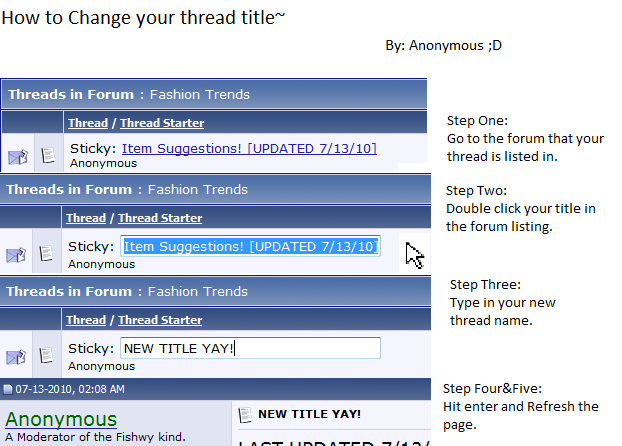 Picture Guide By Anonymous | ||||

| Posted 07-24-2010, 03:14 PM |

| ||
|
|
#2 |
Toriki
The Lost Bird

|
||
|
Woot! Got it! Thanks Fen-fen!
|
| ♪♫♪ Self-proclaimed "shy alien ambassador". ♪♫♪ Warning: Tori likes to huggle and snuggle and glomp people randomly. You have been warned. (Oh, I also bite.) | ||||
|
| Posted 07-24-2010, 03:29 PM |
| ||
|
Fenris
Art Meiser
|
|
#3 | ||
|
Quote:
| ||||
|
| Posted 07-24-2010, 03:31 PM |
| ||

|
|
#4 |
Anonymous
Unknown

|
||
|
I made a picture. :B
Found this old gem from the Taskal War xD  Please, call me Annie. <3 My saved avatar back before we had items with color and things glitched when you equipped them.... o-o http://i918.photobucket.com/albums/a...atarglitch.png | ||||
|
| Posted 07-24-2010, 03:31 PM |
| ||
|
Fenris
Art Meiser
|
|
#5 | ||
|
Thanks Anon lots of help. i will add it to the front :D
| ||||
|
| Posted 07-24-2010, 03:32 PM |
| ||
|
|
#6 |
Anonymous
Unknown
|
||
|
Haha of course. I had nothing else to do. P:
Found this old gem from the Taskal War xD Please, call me Annie. <3 My saved avatar back before we had items with color and things glitched when you equipped them.... o-o http://i918.photobucket.com/albums/a...atarglitch.png | ||||
|
| Posted 07-24-2010, 03:33 PM |
| ||
|
johnny
writing machine in bad repair

|
|
#7 | ||
|
Annie's looks better than mine was ending up. xD
 | ||||
|
| Posted 07-24-2010, 03:54 PM |
| ||
|
|
#8 |
Toriki
The Lost Bird
|
||
|
Edit: Oh, never mind.
|
| ♪♫♪ Self-proclaimed "shy alien ambassador". ♪♫♪ Warning: Tori likes to huggle and snuggle and glomp people randomly. You have been warned. (Oh, I also bite.) | ||||
|
| Posted 07-24-2010, 03:57 PM |
| ||
|
Sadrain
Resident ghost caracal

|
|
#9 | ||
|
Ahah, it works also trough advanced edit, if someone's used to other systems, so everything should be covered. ^^
And nice guide, Annie. x3 ~ Hello, I am Sadrain, a ghost Caracal, but you can call me Rainy. Nice to meet you. =^-^= ~ ~Questing: Yearlies, RIGs, Lot of MIs, RUNES (always), Aurum Shop: Selling MOST EIs | NOT updated buying thread ~ |~ Status: Questing so much things I don't know where to start ~| ~Manning Crow's Nest on Haunted Galleon under Captain Lawtan's rule ~ | ||||
|
| Posted 07-24-2010, 04:21 PM |
| ||
|
|
#10 |
Anonymous
Unknown
|
||
|
It's about as good as I can do in MS Paint. xD
Found this old gem from the Taskal War xD Please, call me Annie. <3 My saved avatar back before we had items with color and things glitched when you equipped them.... o-o http://i918.photobucket.com/albums/a...atarglitch.png | ||||
|
| Posted 07-24-2010, 04:34 PM |
| ||
|
Sadrain
Resident ghost caracal
|
|
#11 | ||
|
o3o wow, that's pretty great then. I can deal with GIMP better than Paint. XD
~ Hello, I am Sadrain, a ghost Caracal, but you can call me Rainy. Nice to meet you. =^-^= ~ ~Questing: Yearlies, RIGs, Lot of MIs, RUNES (always), Aurum Shop: Selling MOST EIs | NOT updated buying thread ~ |~ Status: Questing so much things I don't know where to start ~| ~Manning Crow's Nest on Haunted Galleon under Captain Lawtan's rule ~ | ||||
|
| Posted 07-24-2010, 04:42 PM |
| ||
|
|
#12 |
Anonymous
Unknown
|
||
|
I worked better with the old Paint before they updated it with Windows 7. ><'
I couldn't get the background off of the mouse pointer because they changed stuff around. But regardless, it serves it purpose. Found this old gem from the Taskal War xD Please, call me Annie. <3 My saved avatar back before we had items with color and things glitched when you equipped them.... o-o http://i918.photobucket.com/albums/a...atarglitch.png | ||||
|
| Posted 07-24-2010, 05:01 PM |
| ||

|
|
#14 |
SakuraMinamino
Red-aholic

|
||
|
Ha, I was just trying to figure out how to do this, cause when I hit edit it wasn't an option. Thanks, Fen! Very good to know ^^
| ||||
|
| Posted 08-17-2010, 12:52 PM |
| ||
|
SakuraMinamino
Red-aholic

|
|
#15 | ||
|
Hmm. Okay nevermind, I must be doing something wrong. I double click and the edit ability pops up, that's all good. But before I can type anything it follows the link and goes to my thread. What am I doing wrong?
| ||||
|
| Posted 08-17-2010, 12:54 PM |
| ||

|
«
Previous Thread
|
Next Thread
»
| Currently Active Users Viewing This Thread: 1 (0 members and 1 guests) | |
| Thread Tools | |


|
|

All content is copyright © 2010 - 2026 Trisphee.com
FAQ | E-Mail | Terms of Service | Privacy Policy | Forum Rules
Twitter | Facebook | Tumblr
FAQ | E-Mail | Terms of Service | Privacy Policy | Forum Rules
Twitter | Facebook | Tumblr